Deleting all target content from bilingual TagEditor file
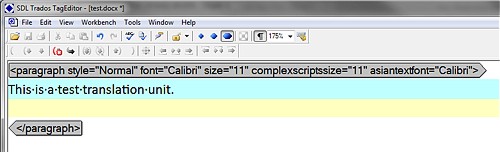
When performing conversions between CAT tools with the objective of obtaining a Trados TagEditor file for translation, it often happens that a source content (original text for translation) gets copied into the target area of the translation unit. Despite deleting the unwanted text is just a matter of a few key presses, it can (and mostly is) annoying when working with large files. Use this simple procedure to get a "clean" TTX file for translation.
Pre-requisites:
- TagEditor file to be cleaned (TTX)
- Notepad2 freeware text editor (download here)
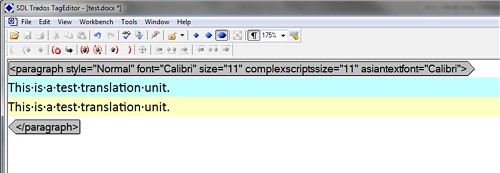 And desired situation
 I recommend creating a backup file just in case something goes wrong.
Proceed as follows:
1. Open Notepad2.
2. Open the source TagEditor file (TTX) in Notepad2.
3. Select Edit -> Replace or use Ctrl+H shortcut.
4. Enter this into the Search string field: <Tuv Lang="XX">.*?</Tuv>
Note: Do not forget to substitute XX for the target language code. Ex.: CS for Czech.
5. Enter this into the Replace with field: <Tuv Lang="XX"></Tuv>
Again, substitute XX with the target language code.
6. Check the Regular expression search checkbox.
7. Press the Replace All button.
8. Save the resulting file.
Now you have a clean source TTX file for translation.
I recommend creating a backup file just in case something goes wrong.
Proceed as follows:
1. Open Notepad2.
2. Open the source TagEditor file (TTX) in Notepad2.
3. Select Edit -> Replace or use Ctrl+H shortcut.
4. Enter this into the Search string field: <Tuv Lang="XX">.*?</Tuv>
Note: Do not forget to substitute XX for the target language code. Ex.: CS for Czech.
5. Enter this into the Replace with field: <Tuv Lang="XX"></Tuv>
Again, substitute XX with the target language code.
6. Check the Regular expression search checkbox.
7. Press the Replace All button.
8. Save the resulting file.
Now you have a clean source TTX file for translation.